ADD/EDIT ADDITIONAL USERS
As a Contractor you can add additional users to your account. If you have an assistant or hire someone to help you, as the main user, you may go into LCPtracker and add your additional users.
For those using Daily Reporter you may set up and assign roles (Daily Reporter Manager, Superintendent, and Foreman). Please skip to the Daily Reporter section to read the difference in the different user role options prior to setting up the additional user.
Only the Full Contractors in the account will have the ability to add or edit additional users. Additional Users will be added and edited under Set Up>Add/Edit Additional Users.
Any Limited Contractor roles will NOT have access to the Add/Edit Additional Users button on their Set Up screen.
When you go into Add/Edit Additional User, if you click on the drop down you will see all users currently set up. The Main Contact information can be updated in Set Up>Company Information or Set Up>Add/Edit Additional Users.
To add an additional user, you will enter their email address, name, and phone number, select their role then click Save to create that new username.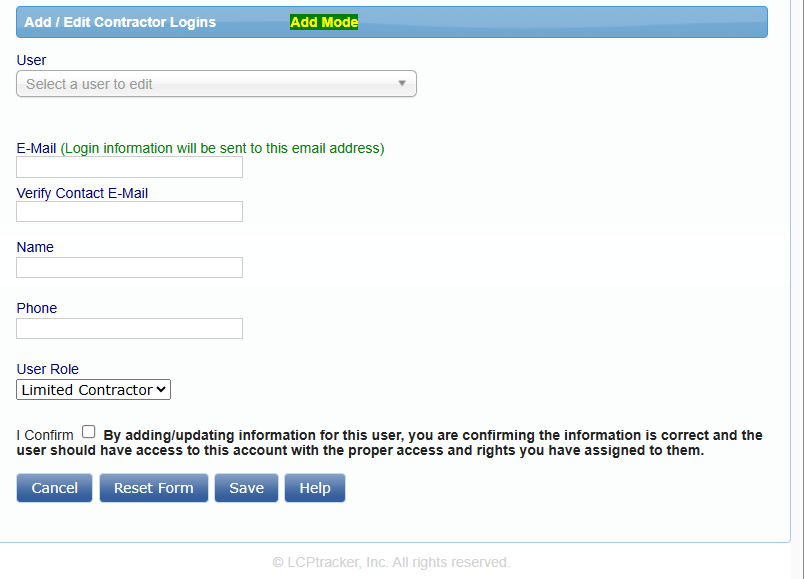
Once you have clicked Save, the user will be sent an email letting them know their user ID and a temporary password.
Once the Additional User receives his/her login information, they can log into the system. As with all new users, the system will require them to change the temporary password and create their own eSignature Password.
Note: If you have multiple agencies you are working for, you will need to set up the Users under each Administrator in the same manner.
Daily Reporter Users
The main users of your account will need to log into your LCPtracker account and setup the Daily Reporter users and their roles. There are three different types of roles that can be assigned to the Add/Edit Additional Users for those using Daily Reporter – Daily Reporter Manager Role (can only be setup by an LCPtracker Implementation Project Manager or Account Manager), Superintendent, and Foreman.
Note: if you have multiple Agencies you are working for and are using Daily Reporter under each, you will need to set up the users under each Administrator in the same manner.
Daily Reporter Manager Role
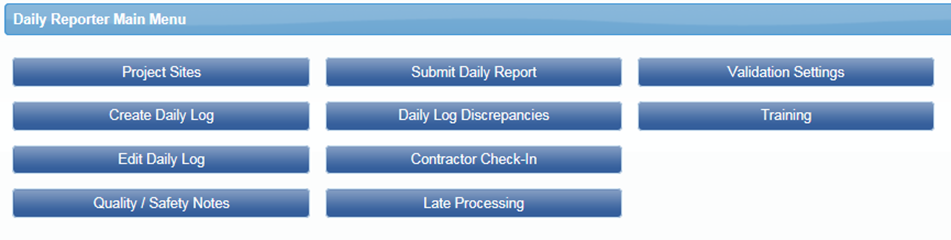
The Manager Role will have access to everything as the main user; the only difference is the Daily Reporter Manager Role cannot set up or edit Additional Users. As the Daily Reporter Manager user role, you have the ability to:
- Create and Edit Daily Logs.
- Enter Quality/Safety Notes.
- Submit Daily Report (Combined Daily includes all information for all subs for that day).
- Look into Daily Log Discrepancies.
- Organize Contractor Check-In.
- Review Late Processing.
- Set Validation Settings for Daily Reporter (Only).
- Add/edit Project Sites.
Daily Reporter Superintendent Role
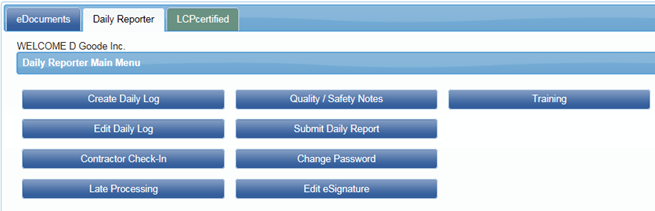
Superintendent Role will only see the eDocuments and Daily Reporter tabs. With the Superintendent user role, you can:
- Create and edit Daily Logs for your own company.
- Organize Contractor Check-in.
- Review Late Processing.
- Enter Quality/Safety Notes.
- Submit Daily Report (Combined Daily includes all information for all subs for that day).
You will have the ability to allow the Foreman role to edit dailies, change your own password, or edit your eSignature password (for help with Change Password or Edit eSignature see Contractors User Manual).
Daily Reporter Foreman Role
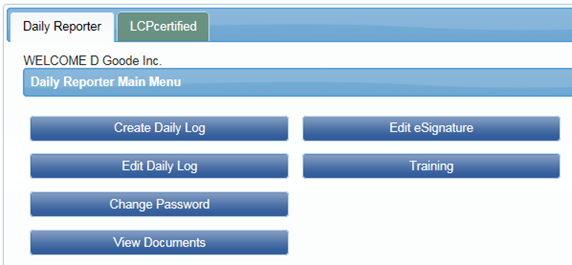
Foreman Role will only see the Daily Reporter tab. The Foreman user role can:
- Create daily logs for your own company.
- View documents.
- Change your own password.
- Edit your eSignature password.
With permission from the Superintendent, you will be allowed to edit your own daily reports that were submitted, if needed.
Was this article helpful?
That’s Great!
Thank you for your feedback
Sorry! We couldn't be helpful
Thank you for your feedback
Feedback sent
We appreciate your effort and will try to fix the article